
Every tracked hour belongs to a project, and every project belongs to a client. Your team chooses the project before they start, so the hours are already sorted by the time you come to bill them.
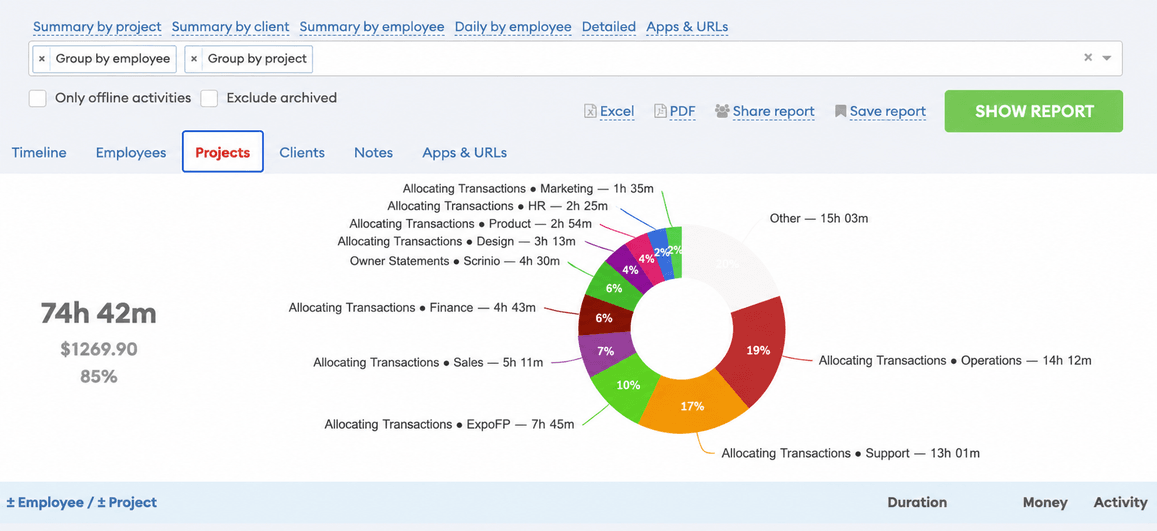
The project is chosen before the timer starts
Your team picks a project from a list before they press Start, and adds a note about the task. That is the whole ceremony.
It is also the reason the hours are ready when you invoice, instead of being reconstructed on a Friday afternoon.
A colour for each project
Each project has a colour, and the timeline is painted with it. A day that should have been one project and turned into four is visible before you have read a single number.
Clients group projects
Projects belong to clients. So the question agencies actually ask — how many hours did this client cost us this month, and across which projects? — is one filter rather than a spreadsheet. Reports filter and group by client as easily as by project.
Groups of people
Put people into groups: a team, an office, a shift. Then report on the group instead of ticking twelve names every time.
Archiving keeps the history
When a project finishes, archive it. It disappears from the list your team chooses from, and every hour ever tracked against it stays in your reports. Nothing is deleted to tidy up a dropdown.
More features
All features · How it works · Plans & pricing